We’re thrilled to announce the release of Keyman 18.0!
This latest release is open-source and free to download from the official Keyman website. If you have thoughts or suggestions, we’d love to hear them on the Keyman Community site!
Keyman 18.0 includes over 700 updates—ranging from bug fixes and performance tweaks to brand-new features. In this blog post, we’ll highlight the most significant changes. For the full list of updates, check out the complete changelog.
Keyman for Windows
- Minimum supported version of Windows is 10.0
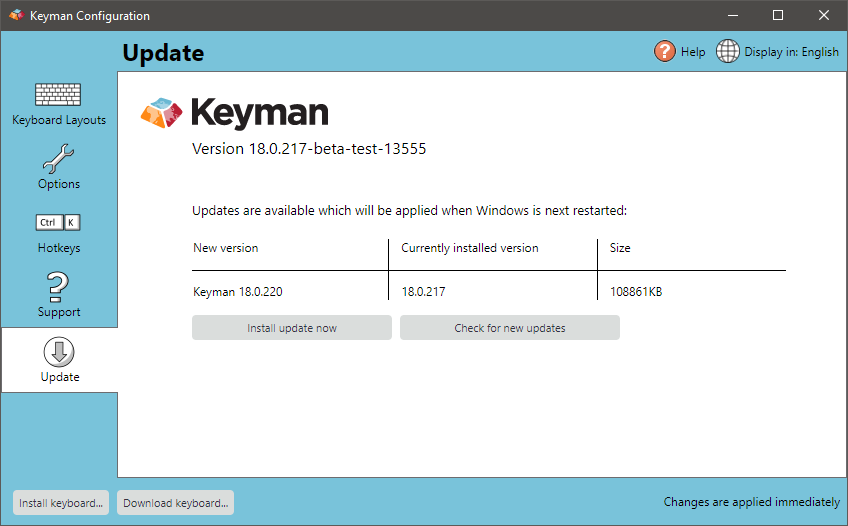
- Updates to Keyman are now applied before Keyman starts for the first time in a session, so Windows no longer needs to be restarted (#10041)
- Keyman no longer adds a desktop shortcut when it is installed (#11401)
- Added an option to make Right Alt and Right Control also work for keyboard switching hotkeys if preferred (#11471)
- Improve UI of update tab in Keyman Configuration (#13555)
Keyman for macOS
- Minimum supported version of macOS is 10.13 High Sierra.
- Improved handling of Option key and how it relates to Alt key in Keyman keyboards (#12458)
- Keyman keyboards are now stored in the preferred location,
/Library/Application Support, instead of/Documents(#12106) - Removed ‘Use Verbose console Logging’ option and use Apple unified logging system instead (#12431)
- Removed ‘Always Show OSK’ option and automatically remember OSK window state instead (#12355)
Keyman for iPhone and iPad
- Minimum supported version of iOS is 13.0.
- Predictive text and on screen keyboard startup performance improvements (#11784, #11264, #11265)
- Keyboard size can now be adjusted to your preference (#12571)
Keyman for Android
- Minimum supported version of Android is 5.0 (requires minimum version of Chrome 57.0)
- ENTER key can now handle different actions such as: newline, Previous, Next, Submit, and Search. (#12125, #12315, #12473)
- New menu to adjust the the number of milliseconds (300 ms to 1500 ms) required to trigger a longpress gesture (#12170, #12185)
- Navigation arrows for back / forward actions now show correctly in right-to-left (RTL) languages (#12227)
- Predictive text and on screen keyboard startup performance improvements (#11784, #11264, #11265)
Keyman for Linux
- Minimum supported version for Ubuntu is Ubuntu 22.04 Jammy (#12003).
- Other supported versions of Ubuntu are 24.04 Noble and 24.10 Oracular.
- Keyman no longer requires a patched version of ibus as Keyman now uses a system service to manage keystroke order (#11535).
- Support for simulation of AltGr (right Alt) with Ctrl+Alt (#11852).
KeymanWeb
- Minimum supported version of Chrome is 53.0
- KeymanWeb compilation target is now ES6 rather than ES5 (#10257)
- BREAKING: Lexical-models with custom wordbreakers require a more strict adherence to the wordbreaker specification (#12200, lexical-models#265)
Keyman Developer
- Updated to Unicode 16.0 (#12393)
- Improve automatic detection of minimum Keyman version for a keyboard during compilation (#11981, #11982, #11965, #11957)
- Generate keyboards and lexical models from templates, with
kmc generate(#11014) - Clone existing keyboard and lexical model projects, both from local file system and also from any open source online Keyman keyboard in Keyman Cloud or GitHub, with
kmc copyand New Project dialogs (#12555, #12586, #13076) - Support extending existing
&displaymapdata files when adding new characters (#12622) - Font settings for on screen keyboards are now kept consistent with package metadata during compilation (#12949)
- New npm module @keymanapp/langtags makes langtags.json easily accessible (#13046)
- Compiler messages now have links to additional documentation (#13156)
Keyman Core
- Groundwork underway for integration into Keyman for Android, Keyman for iOS, KeymanWeb
Keyman Engine for Android
- New API functions
setLongpressDelay(),getLongpressDelay()added for adjusting longpress delay (help.keyman.com#1500, #12185) - Move responsibility for setting keyboard height preference into applyKeyboardHeight() (#13578)
Keyman Engine for iOS
- New API functions for setting On Screen Keyboard height
New Localizations
- Polytonic Greek added for Android and iOS (#11877)
- Arabic added for Android (#12228)