While on the topic of AddLanguageProfile – Vista changes the behaviour
of this function.  In Windows XP, it would install the TIP across the
user’s currently installed languages, and just to be helpful, add
Chinese (Simplified and Traditional), Japanese, and Korean languages
with the TIP installed for each of those languages.  That’s not too
hard to fix up.  However in Vista, this simple function call will not
only , but will also add every single language installed on the system
to the user’s profile – resulting in the following impressive dialog:
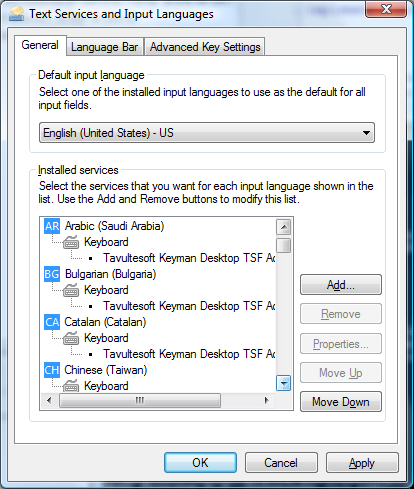
Textservicesandinputlanguagesaftert

The list of languages goes on seemingly for ever.  Not only does this
list every language – it also lists every sublanguage – Arabic (Saudi
Arabia), Arabic (Iraq), Arabic (Egypt) and so on and so forth.  For
good measure, the languages aren’t installed alphabetically, but rather
in the order of the language identifiers (0x0401 for Arabic (Saudi
Arabia), 0x0402 for Bulgarian)…

Categories: Developing Keyman

Related Posts

Developing Keyman

Keyman Update for 9 October 2026

We bring another testimony from our Community site. Keyman has entered the 19 beta phase after v19.0.299-alpha with more development also coming to v20-alpha. Furthermore, Keyman 18.0.253 had also released in this cycle, alongside many keyboard enhancements and a newly submitted predictive text. Let's welcome our newly introduced two contributors for their efforts in the predictive text and keyboard work!

Developing Keyman

Keyman 19 is now in beta

We are happy to announce that Keyman 19 was released to beta on 6 Oct 2026. During this time, we will be working on stability and documentation, in preparation for a full 19.0 release early Read more…

Developing Keyman

Keyman Update for 25 September 2026

This edition highlights the latest Keyman product and keyboard development updates from 14 — 25 September 2026, describing recent progress across the project and contributions from the community. A few links Learn how to create Read more…