Configure Opera Mini to make Amharic and other custom text visible

1) In Opera Mini, visit opera:config by typing it into the URL bar:

Opera_config

2) Find "Use bitmap fonts for complex scripts", set it to "Yes", and click "Save":
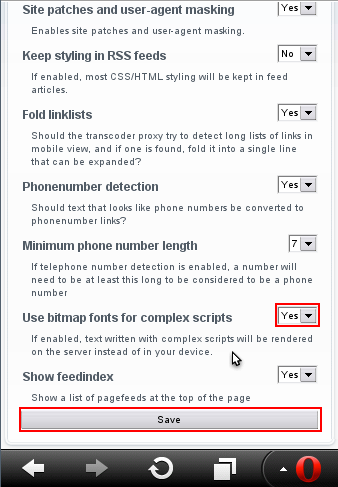
Opera-mini-config

You may also need to switch off "Single column view" in Opera Mini Settings.

Categories: Developing Keyman

0 thoughts on “Enable custom fonts in Opera Mini”

Leave a Reply

Your email address will not be published. Required fields are marked *

This site uses Akismet to reduce spam. Learn how your comment data is processed.

Related Posts

Developing Keyman

Keyman 19 roadmap update

Last week, we held an online team review of the status of the Keyman 19 release. As we wrote in our previous roadmap blog post, we have had significant resource shortfalls in the last year Read more…

Developing Keyman

Keyman Update for 22 May 2026

This blog reports on significant Keyman product and keyboard development updates over the period from 11th — 22nd May 2026. As always, you can follow all of our development online at github.com/keymanapp/keyman, and you may Read more…

Developing Keyman

Keyman Update for 8 May 2026

This blog reports on significant Keyman product and keyboard development updates over the period from 27 April 2026 — 8 May 2026. As always, you can follow all of our development online at github.com/keymanapp/keyman, and Read more…